How to build your own Claude Code (Part 1)
Have you ever wondered how Claude Code, Cursor, or any other coding agents work?
Given one prompt (or one task), Claude Code can do things (read file, write file, delete file, execute commands, etc) until it’s finished.
I’m going to share what I’ve learned, with just one file
...
  while (true) {
    const response = await client.chat.completions.create({
      model: "anthropic/claude-haiku-4.5",
      messages,
      tools: tools as OpenAI.ChatCompletionTool[],
    });

    if (!response.choices || response.choices.length === 0) {
      throw new Error("no choices in response");
    }

    const choice = response.choices[0];
    const message = choice.message;

    messages.push({
      role: "assistant",
      content: message.content ?? null,
      ...(message.tool_calls ? { tool_calls: message.tool_calls } : {}),
    })

    if (message.tool_calls && message.tool_calls.length > 0) {
      for (const toolCall of message.tool_calls) {
        if (toolCall.type !== "function") continue;
        const functionName = toolCall.function.name;
        const args = JSON.parse(toolCall.function.arguments);

        if (functionName === "Read") {
          const fileContents = fs.readFileSync(args.path, "utf8");
          messages.push({
            role: "tool",
            tool_call_id: toolCall.id,
            content: fileContents,
          });
        }
        if (functionName === "Write") {
          fs.writeFileSync(args.file_path, args.content);
          messages.push({
            role: "tool",
            tool_call_id: toolCall.id,
            content: "File written successfully",
          });
        }
        if (functionName === "Bash") {
          const result = execSync(args.command);
          messages.push({
            role: "tool",
            tool_call_id: toolCall.id,
            content: result.toString(),
          });
        }
      }
      continue;
    }

    if (message.content) {
      console.log(message.content);
    }
    break;
  }
}
The secret recipe to coding agents is this agentic loop.
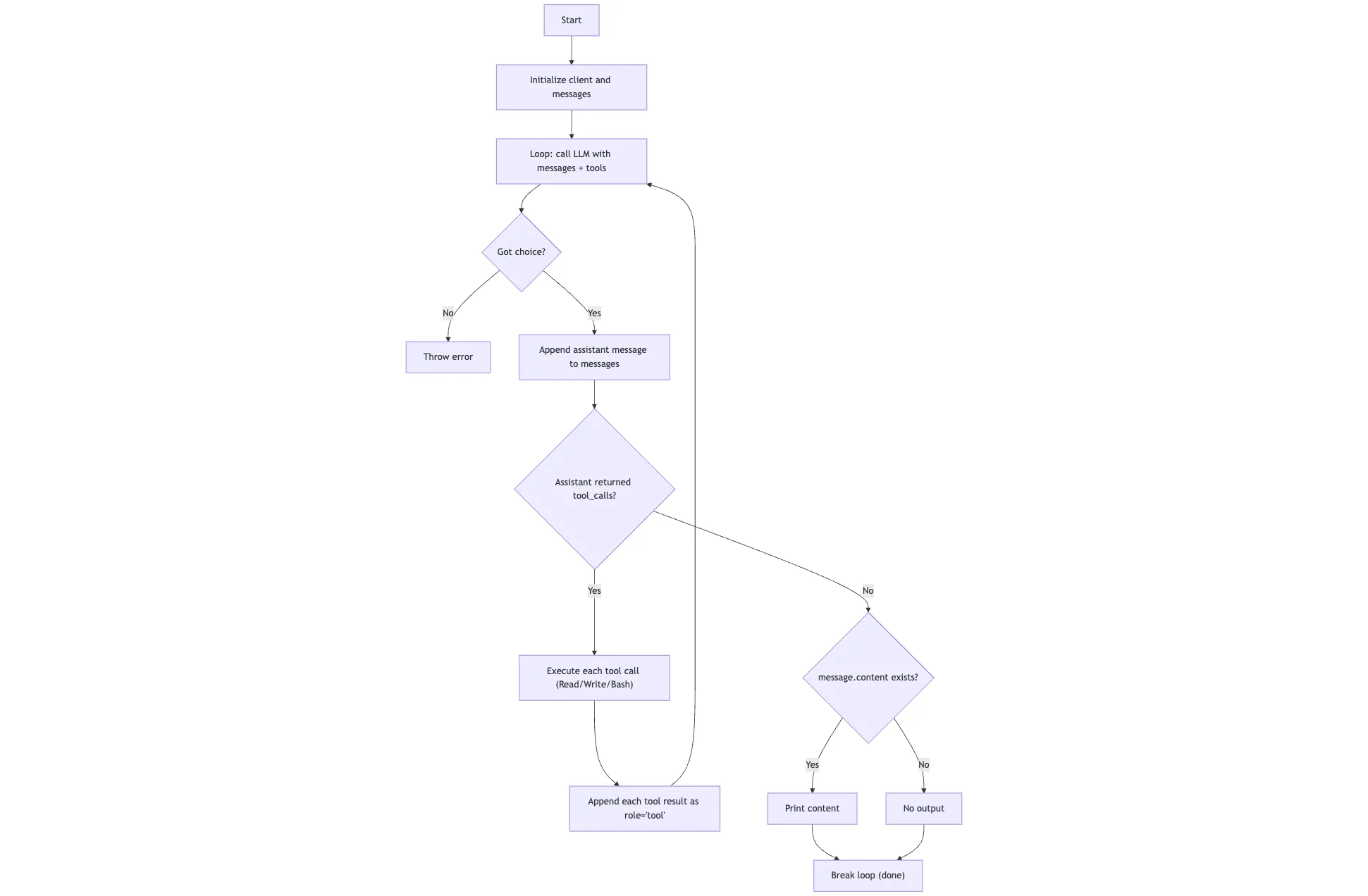
Basically, this is how it works:
- The program starts with a user prompt and stores it in messages.
- It sends messages plus available tools (Read, Write, Bash) to the model.
- The model responds, and that assistant response is always appended to messages. If the response includes tool_calls, the program executes each tool, appends each tool result back into messages as a tool message, and loops again.
- This loop repeats: model -> tool call -> tool result -> model, until the model returns a response with no tool calls. When there are no tool calls, the program prints the final assistant text (if any) and exits.
You can take the code and ask coding agent you use to help you understand the idea behind this.
Hope this is useful, enjoy your day!
Enjoyed this article?
Get future posts delivered to your inbox so you never miss one. You can also follow via RSS feed.
Subscribe via email